
by Hassaan Mazhar, Last updated: June 11, 2026
Quick Summary
State agencies running quarterly board meetings face a three-part operational challenge: broadcasting live to the public, retaining a defensible archive, and making eight hours of proceedings searchable without a dedicated AV team. This guide walks through the exact workflow, from RTMP ingest to AI-indexed VOD, using an enterprise video platform built for government deployment models, including on-premises and FedRAMP-aligned cloud environments.
The Transparency Pressure State Agencies Are Navigating Right Now
Public records obligations are not new. What is new is the gap between what citizens expect and what most agencies can actually deliver.
Quarterly board meetings, pension fund reviews, regulatory hearings, legislative sessions, regularly run six to eight hours. Attendees expect a live feed. Constituents who couldn't attend expect an on-demand replay. FOIA requestors expect a searchable archive. And all of this is expected within hours of adjournment, not days.
The infrastructure most agencies built for this is not holding up. Hardware-based lecture capture systems, standalone recorders that encode to physical drives or proprietary cloud accounts — were designed for a different era. They require on-site maintenance, produce files that are difficult to search, and often lack the ingest flexibility to work with modern AV switching setups. When they reach end-of-life, replacement is expensive and disruptive.
What the modern public meeting workflow looks like, and how agencies are transitioning to it without ripping out existing infrastructure, is the focus of this guide.
The Modern Public Meeting Workflow: Four Steps From Broadcast to Searchable Record
Step 1: Capture From Existing AV Infrastructure
The most common barrier agencies cite when evaluating modern video platforms is the assumption that new software requires new hardware. It does not.
Enterprise video platforms built for government environments support RTMP and RTSP ingest, the same protocols used by Sony PTZ cameras, Panasonic switchers, Blackmagic ATEM units, and most broadcast-grade AV equipment already installed in council chambers and hearing rooms.
The workflow at the encoder level does not change. The RTMP stream that currently feeds a hardware recorder is redirected to the platform's ingest endpoint instead. For agencies running hybrid AV setups, some rooms with managed switching, others with simpler setups — cloud and on-premises ingest options can be configured independently per venue.
What agencies don't need to replace:
-
Existing cameras and PTZ systems
-
Existing video switchers and mixing boards
-
Existing recording hardware (it can run as a backup, if preferred)
-
Existing AV cabling and room infrastructure
This matters operationally because most state IT procurement cycles run 12 to 18 months. Agencies that can demonstrate continuity of existing AV investments have a significantly smoother path to approval and implementation.
Step 2: Publish the Live Stream Instantly
Once the RTMP feed is connected to the platform, publishing a live stream is a configuration task, not a technical event.
The platform generates a persistent stream URL, a stable, bookmarkable link that does not change between sessions. That URL can be embedded directly into the agency's public website via a responsive iframe or player embed. It can be set to public access (no login required) for open public meetings, or restricted access for executive sessions and working groups.
For recurring meetings, monthly pension board sessions, quarterly regulatory hearings, the same URL persists across every session. IT staff configure the stream once. Communications staff click "go live" when proceedings begin.
The public-facing player adapts to device and bandwidth automatically. Adaptive bitrate streaming (HLS/MPEG-DASH) means a constituent watching on a mobile connection at 3 Mbps gets a usable stream, not a buffering error.
Step 3: Automatically Create the On-Demand Archive
Live streams are automatically recorded from the moment they begin. When the session ends, the recording is immediately available as a VOD asset, no manual export, no file transfer, no post-processing queue.
The archive is stored in the platform's secure cloud environment, or within an agency-controlled on-premises tenant for environments that cannot send video to external infrastructure. Storage tiers, hot, cold, and archive, allow agencies to configure automatic content migration based on access frequency and retention policy. A recording from last quarter's pension board hearing is still fully accessible, but it may be stored at a lower-cost tier as access frequency declines.
Retention policies are configurable and can be aligned with state records management requirements. Content lifecycle rules can be set to automatically flag, archive, or delete recordings at defined intervals, removing the burden of manual records management from agency staff.
For long sessions, the practical payoff is immediate. An eight-hour board meeting is stored as a single searchable asset, organized by meeting date, with metadata applied automatically.
Step 4: Turn the Archive Into a Searchable Public Record
This is where the operational value compounds significantly beyond simple video hosting.
AI-powered transcription processes the VOD recording automatically, producing a full verbatim transcript synchronized to the video timeline. Transcripts are generated in the platform's background processing pipeline, no additional configuration required after the initial setup.
With automatic chaptering, long recordings are segmented into navigable sections based on detected topic shifts and speaker transitions. A pension board meeting that runs eight hours might be broken into chapters corresponding to each agenda item: opening remarks, investment committee report, public comment period, closed session notice. Each chapter is independently searchable and linkable.
What this enables for different stakeholders:
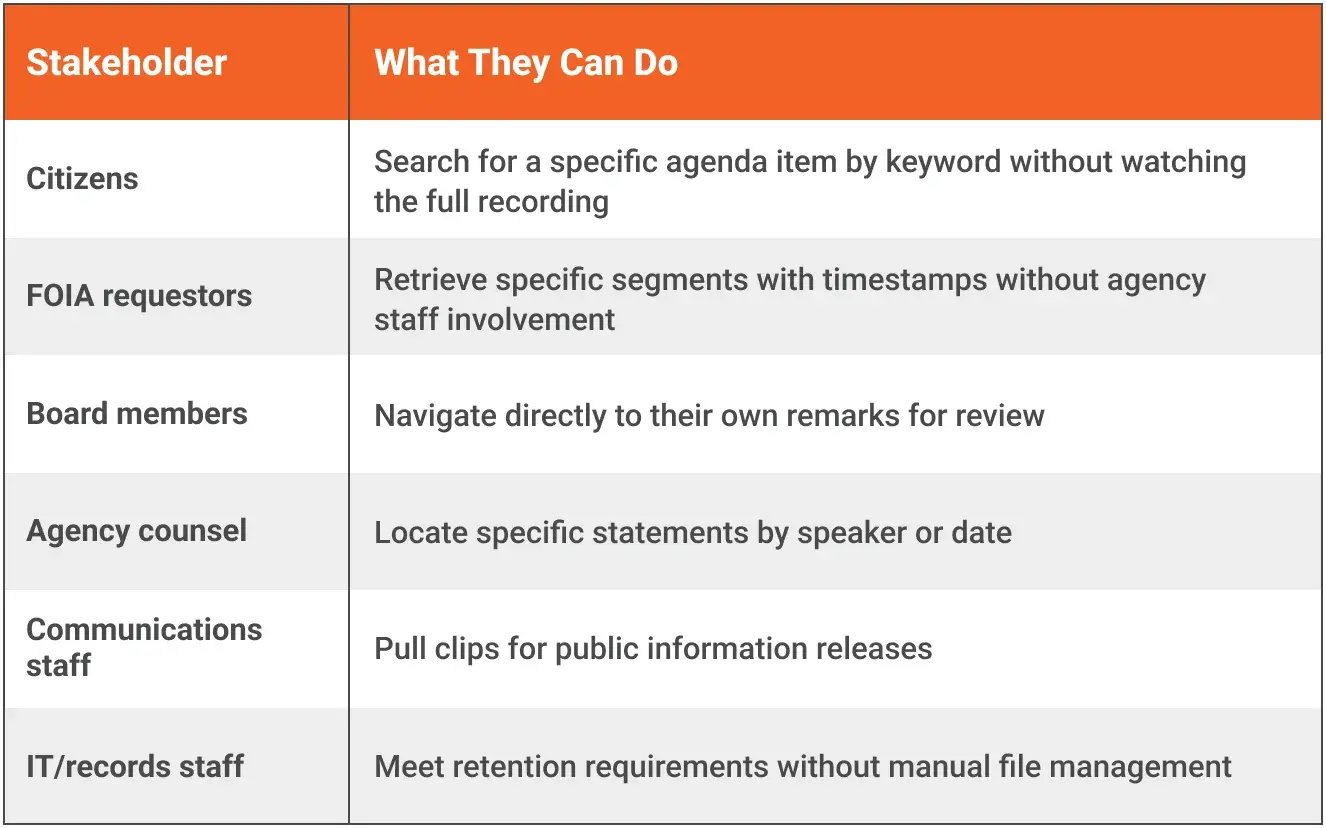
AI-generated tags, combined with manual metadata fields, make recordings retrievable by meeting type, date range, board name, topic, or speaker. Faceted search lets users filter across multiple dimensions simultaneously, narrowing from "all board meetings" to "pension committee meetings from Q4 2025 mentioning investment reallocation" without technical training.
Deployment Flexibility for Government Environments
State agencies operate under procurement constraints, security review requirements, and sometimes explicit data residency mandates that disqualify standard SaaS offerings. A platform that only offers shared-cloud deployment is not a viable option for all government buyers.
EnterpriseTube supports the following deployment architectures:
-
SaaS (Shared/Dedicated) — Fastest time to value. Appropriate for agencies without strict data residency requirements or those operating under existing cloud authority.
-
Government Cloud — Deployed within a FedRAMP-aligned cloud environment. Appropriate for agencies with cloud security requirements that exceed standard commercial SaaS.
-
On-Premises — Full platform deployment within the agency's own data center. Video never leaves agency-controlled infrastructure. Appropriate for agencies with explicit on-premises mandates or classified/sensitive meeting content.
-
Private Cloud / Hybrid — Agency controls the tenant; cloud infrastructure provides scalability. Appropriate for agencies that want cloud economics without shared infrastructure.
-
Azure Marketplace (BYOL / Transact) — For agencies with existing Microsoft Azure agreements and government cloud tenancy.
Security posture across all deployment models includes AES-256 encryption at rest, TLS 1.3 in transit, role-based access control (RBAC), SSO via SAML 2.0 or Azure AD, multi-factor authentication, IP restrictions, audit logging, and configurable session policies.
For government environments specifically, the platform supports FIPS 140-2 and FIPS 200 compliance requirements, and NIST-aligned security controls, the same controls referenced in most state IT security frameworks.
One compliance note worth stating plainly: for standard public board meetings (open session proceedings, non-law enforcement content), CJIS considerations do not apply. Agencies handling content that may touch CJIS-regulated data, recordings from joint public safety meetings, for example, should evaluate deployment configuration with their CJIS Security Officer.
Budgeting for a Quarterly Meeting Use Case
Government IT budgets for video infrastructure are often evaluated against the wrong baseline: full enterprise video management deployments sized for thousands of internal users, hours of daily upload activity, and large training libraries. A quarterly board meeting use case is a fundamentally different cost profile.
Primary cost drivers for a board meeting deployment:
-
Admin licenses — The number of platform administrators required is small for this use case. Typically: one IT administrator, one communications staff member, and one records manager. Viewer access for public streams does not require licensed seats.
-
Storage — Calculated based on recording volume and retention period. Eight hours of HD video per quarter, retained for five years under standard records requirements, is a well-defined and predictable storage budget. Hot/cold/archive tiering reduces long-term storage costs as recordings age.
-
Bandwidth — Live stream bandwidth scales with concurrent viewers. A public board meeting with 50 to 500 simultaneous viewers is well within standard CDN capacity at predictable cost. Adaptive bitrate delivery optimizes bandwidth consumption automatically.
-
Processing — AI transcription, chaptering, and tagging are processing-intensive tasks, but for a quarterly meeting use case, they run on a predictable schedule and volume.
How to build a reliable estimate:
-
Count quarterly sessions (meeting frequency × number of boards/committees)
-
Estimate average session duration
-
Set a retention period aligned with your state's records management schedule
-
Estimate peak concurrent viewer count for live sessions
-
Request a usage-based quote against those parameters
Processing Units (PUs), VIDIZMO's consumption-based pricing model for AI processing, allow agencies to pay for transcription, tagging, and AI analysis based on actual usage rather than a flat license fee, which is cost-effective for low-frequency, high-duration content like board meetings.
Why Agencies Are Replacing Legacy Hardware Recorders
The decision to move away from hardware-based recording systems is rarely made in isolation. It typically follows a trigger event: a unit reaches end-of-life, a vendor discontinues support, a records audit reveals gaps in the archive, or a FOIA request exposes that content is unsearchable.
Side-by-side comparison:
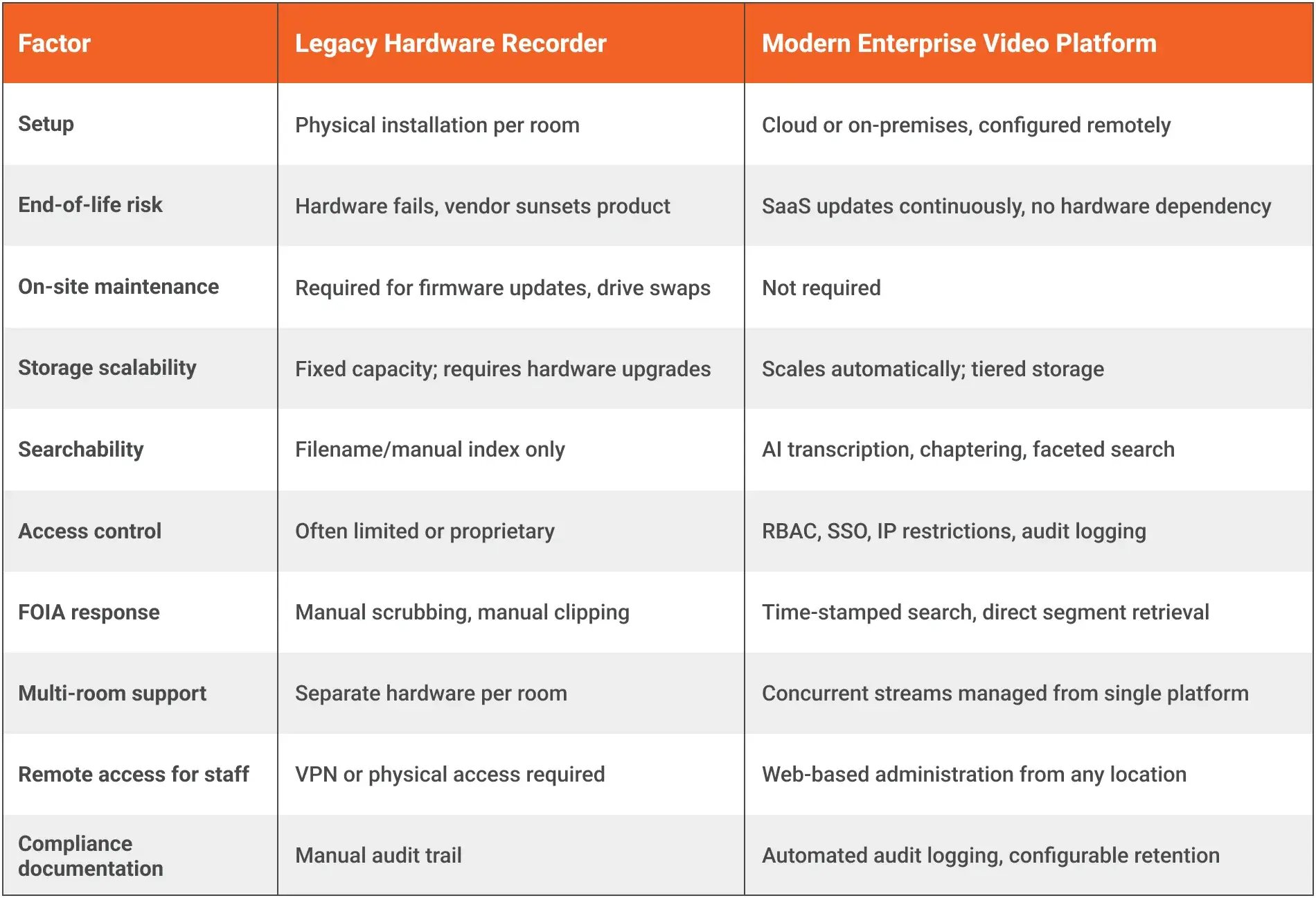
The total cost of ownership argument for modern platforms strengthens considerably when on-site maintenance labor, hardware refresh cycles, and manual FOIA response time are factored in alongside licensing costs.
For agencies currently evaluating a hardware replacement cycle, the transition period is also worth planning for: the Kaltura Migration App and metadata import tooling in EnterpriseTube support bulk migration of existing archives, including metadata from spreadsheets, XML, and database exports, without starting a new archive from scratch.
What the Public Actually Experiences
It is worth stepping back from the operational workflow to describe what this looks like from the citizen's perspective, because the public-facing experience is ultimately what transparency mandates are designed to serve.
-
Before the meeting: The agency website lists upcoming board sessions with a "Watch Live" button linked to the persistent stream URL. No registration required. No app download required.
-
During the meeting: The live player loads in-browser with adaptive quality. Citizens watching from home see the same feed as those watching in the chamber lobby. Chat, Q&A, and public comment features can be enabled for interactive meetings where that is appropriate.
-
After the meeting: The VOD is available within minutes of the session ending. A full transcript appears below the player. Chapter markers allow direct navigation to specific agenda items. Keyword search retrieves exact timestamps where a topic was discussed. Downloadable transcript files are available for accessibility and records purposes.
This is not a theoretical capability. It is the current standard for government bodies that have completed this transition, and it is the baseline citizens are beginning to expect when they see it done well elsewhere.
From Broadcast to Public Knowledge Asset
Livestreaming board meetings was once primarily a compliance exercise: put the meeting on video, make it technically accessible, check the box. The infrastructure available now changes the value proposition.
When every session produces a transcript, a chapter index, and a searchable keyword record, automatically, without manual post-production, the recording becomes a knowledge asset, not just a compliance artifact. Citizens can find what they need without sitting through six hours of proceedings. Staff can retrieve specific statements without rewatching the full session. Records requests can be handled faster. Institutional memory becomes searchable.
State agencies that have modernized their public meeting infrastructure are not just meeting transparency requirements more efficiently. They are building an accessible public record that serves constituents for years after the meeting ends.
Explore Further
If you are evaluating enterprise video platforms for government public meetings, these resources are worth reviewing before a procurement conversation:
- Government Video Platform Guide — Covers public-facing video infrastructure considerations for state and local government
- FOIA and Government Knowledge Management — How video archives support FOIA response workflows
- Choosing an Enterprise Video Platform — Whitepaper covering deployment, security, and evaluation criteria
- EnterpriseTube Government Contracting Vehicles — Procurement options for state agencies
About the Author
Jump to

What is RTMP? A Practical Guide for Enterprise Video Teams
Best Enterprise Video Platform for Secure & Sensitive Content (2026)

No Comments Yet
Let us know what you think