
by Hassaan Mazhar, Last updated: July 16, 2026

Most teams start using YouTube for business video because it is free and everyone already knows how it works. That logic holds right up until the first video that should not be public ends up one shared link away from a competitor, or until an auditor asks who watched a compliance training and the only answer you have is a view count. At that point YouTube stops being a convenience and becomes a risk you have to explain to your security team.
The good news is that you do not have to choose between YouTube's ease of use and real control. You do need to know what you are actually solving for, because "a secure alternative to YouTube" means different things depending on whether you are sharing one sales demo or running a library of a thousand training videos.
Where YouTube runs out of room for business video
YouTube is a public broadcast platform. Everything else about it follows from that design choice, and most of the gaps below are not bugs you can configure around.
Access is all or nothing. A video is public, or it is unlisted, which still means anyone who gets the link can watch and forward it. There is no way to limit a video to verified company emails, to a single department, or to people who are still employed. Your newest intern and your CFO have identical access.
Anyone can keep a copy. Browser extensions pull YouTube videos down in seconds. Once a file leaves your control, it does not come back, and you have no record that it happened.
The reporting is thin. YouTube gives you aggregate view counts, not who watched, from where, for how long, or whether they finished. If you need to prove that 400 employees completed a required course, view counts will not pass an audit.
There is no compliance posture to inherit. YouTube is not built around HIPAA, SOC 2, GDPR data residency, retention rules, or exportable access logs, because consumer video does not need them. Regulated content does.
If your only real need is to send a single video to one person without it leaking, you may not need to leave YouTube behind at all. You can share individual videos privately and securely with a purpose-built tool. The case for a full platform starts when one-off sharing turns into a recurring program.
What a secure YouTube alternative actually needs
Before comparing products, it helps to fix the criteria. A platform earns the word "secure" when it gives you the following, not when its marketing page says "enterprise grade."
- Role-based access control. Permissions set by department, team, folder, or individual video, ideally synced to your directory groups so access ends when employment does.
- Authentication you already use. Single sign-on through Okta, Azure AD, or SAML, so video is not a separate password to manage.
- User-level audit logs. A record of who watched what, when, from where, and whether they completed it, exportable for reviews.
- Expiring and restricted links. Tokenized links with expiry dates, view limits, passwords, or domain and IP restrictions for anything shared outside the company.
- Leak protection. Encryption in transit and at rest, plus dynamic watermarking and download controls that make content harder to walk off with.
- Lifecycle and retention controls. Scheduled publishing, automatic archiving, and retention rules that match your compliance requirements.
- Deployment choice. Cloud, on-premises, or hybrid, so teams with strict data rules can keep video inside their own environment.
If you want to see how specific vendors score against this list, the roundup of secure enterprise streaming platforms walks through named options in detail.
YouTube vs an enterprise video platform
Here is the same content in a side-by-side view, since the difference is easier to judge as a table than as prose.
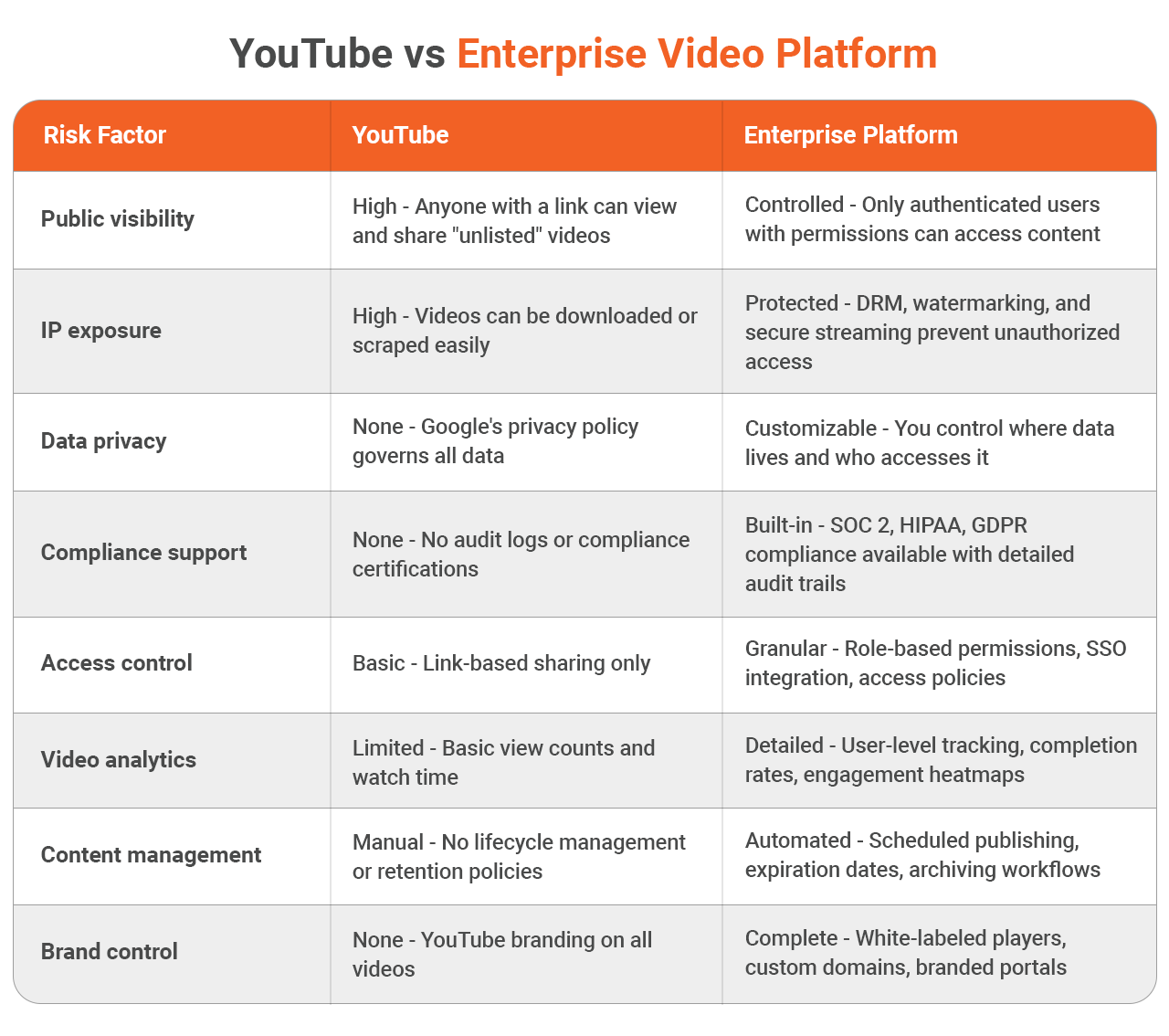
The point of the table is not that one tool is better at everything. It is that YouTube and an enterprise platform are built for different jobs, and using the wrong one for confidential content is where the risk lives.
Match the alternative to the problem you are solving
"Secure YouTube alternative" covers at least five different needs. Picking the right path saves you from buying more platform than you need, or less.
You need to send confidential videos to people outside the company
Sales demos with client-specific pricing, board updates, or partner content all fall here. You want expiring links, view tracking, and download blocking rather than a full library. Start with the guide to sharing videos privately and securely.
You need a permanent private home for many videos
When the volume grows past a handful of shares, you need a private video hosting platform with folders, permissions, and search, not a pile of unlisted links.
You are comparing named vendors
If you are at the shortlist stage, read the breakdown of the top enterprise video hosting platforms and the updated comparison of enterprise video platforms. If a consumer tool is your current baseline, the best Vimeo alternatives covers that angle.
You work in a regulated industry
Healthcare, finance, and government have requirements YouTube cannot meet. For the clinical side specifically, see HIPAA-compliant video platforms. Public sector teams with classified or controlled content can review options built for government video needs.
Your library has grown faster than your ability to manage it
Once you pass a few hundred videos, the problem is organization and findability, not hosting. That is the job of a video content management system.
Most enterprises end up needing several of these at once, which is the real argument for a single platform over stitching tools together.
Where EnterpriseTube fits
EnterpriseTube is a VIDIZMO product built for the criteria above. It provides role-based access down to the individual video, SSO through your existing identity provider, encryption in transit and at rest, user-level audit logs, expiring links, watermarking, and retention controls. For regulated teams it supports HIPAA, SOC 2, and GDPR requirements, with cloud, on-premises, and hybrid deployment so video can stay inside your environment when it has to.
It also keeps the part of YouTube that made it useful in the first place. Uploads play back on any device, AI-generated transcripts make spoken words and on-screen text searchable, and the player carries your branding instead of recommending unrelated videos at the end. You can request a security overview or a live demo to see how it maps to your specific requirements.

Take the Next Step
If you're ready to move beyond YouTube's limitations, EnterpriseTube offers the security, control, and features your organization needs.
Request a security overview - Get a detailed walk-through of EnterpriseTube's security features, compliance certifications, and deployment options.
Schedule a live demo - Our team will show you exactly how EnterpriseTube solves your specific video challenges.
Your enterprise video content deserves better than YouTube. EnterpriseTube gives you a secure alternative to YouTube for enterprises that doesn't compromise on usability or scale.
People Also Ask
YouTube is not built for confidential business video. It offers no role-based access, no user-level audit logs, and no compliance certifications, and unlisted videos remain viewable by anyone with the link. It is fine for public marketing and unsuitable for sensitive internal content.
No. The most restrictive setting, unlisted, still lets anyone who has the link watch and share the video, and private mode limits viewing to specific Google accounts you invite one by one, which does not scale and offers no audit trail. A dedicated platform is the only way to get real access control.
The most secure alternative is an enterprise video platform with role-based access, single sign-on, encryption, audit logging, and compliance support. The right choice depends on your use case, so compare named options in the guide to enterprise video hosting platforms before deciding.
No. YouTube does not sign a Business Associate Agreement and does not offer the access controls or audit logging that HIPAA requires for protected health information. Healthcare teams should use a HIPAA-compliant video platform instead.
No. Many companies keep public marketing videos on YouTube and move only sensitive content, such as training, internal communications, and customer-specific material, to a secure platform. Audit what you have first, then migrate what carries real risk.
About the Author
Jump to

Video CMS: A Complete Guide to Video Content Management Systems [2026]

Best Enterprise Video Platform for Secure & Sensitive Content (2026)


No Comments Yet
Let us know what you think