
by Rafey Iqbal, Last updated: July 16, 2026

Video content management software is no longer optional for organizations producing video at scale. Training recordings, executive town halls, compliance modules, product demos, and meeting archives pile up fast. Without a dedicated system to organize them, they become unsearchable, insecure, and expensive to maintain.
A video content management system (VCMS) is an enterprise video platform designed to store, organize, manage, and distribute video files securely across an organization. Unlike generic cloud storage or file-sharing tools, a VCMS offers centralized video management with features such as metadata tagging, role-based access control, AI-powered search, and analytics. Advanced platforms provide on-premises or cloud deployment options, allowing organizations to retain control over sensitive data while ensuring scalability and compliance with regulations like GDPR or HIPAA.
The Cisco Annual Internet Report projected that video would account for 82% of all internet traffic by 2022, and enterprise adoption has only accelerated since. A Kaltura industry report found that 75% of employees report their organizations are actively encouraging them to produce more business video. Yet many companies still rely on consumer-grade tools or fragmented storage that cannot handle access controls, compliance requirements, or search at scale.
This blog covers the real costs of managing video without a VCMS, the core benefits that justify the investment, practical use cases across departments, and what to look for when choosing the right platform.
What Happens When You Manage Video Content Without a VCMS?
Imagine entering a library where books are scattered across shelves with no labels, order, or serial numbers. That is what happens inside organizations that try to manage video without a dedicated system. The result is wasted time, lost content, security gaps, and avoidable costs.
How Does Unstructured Video Storage Waste Employee Time?
McKinsey research found that employees spend roughly 19% of their workweek searching for information. Video is among the hardest content types to locate when it is scattered across SharePoint folders, Google Drive, Vimeo accounts, and local machines. A task that should take seconds takes minutes, and minutes turn into hours. Without proper metadata, tags, and categories, no one remembers the exact title of a video after days, months, or years, making retrieval painfully slow.
Why Does Storage Sprawl Lead to Escalating Costs?
As organizations rely more on video for communication and training, the demand for storage grows. But without lifecycle policies, old videos accumulate indefinitely. Teams create duplicates because they cannot find the original. Storage costs climb while content quality degrades as outdated videos sit alongside current versions. A proper video content management system addresses this with automated archival, version control, and expiration policies that keep libraries clean without manual intervention.
What Security Risks Come With Unmanaged Video?
Without an enterprise VCMS, you have limited control over security and shareability. Hard drives offer minimal data protection. Consumer cloud storage lacks granular access controls. A training video containing protected health information on an unencrypted platform creates a compliance liability. EnterpriseTube addresses this with SSO, encryption, role-based access control, category access rights, secure embedding, and audit trails.
What Do You Lose Without Platform Integration?
Without integrating other applications into your video platform, there is a lack of interoperability. Enterprise video lives inside meeting platforms, LMS systems, CRMs, and intranets. Advanced video content management systems provide multiple integrations for extensive enterprise video management stored within disparate systems. Read more about overcoming these challenges in our blog on tips for managing large video libraries.
Video Content Management vs File Storage: Which Is Right for Your Enterprise?
Most organizations don't start with a video content management system. They start with what they already have SharePoint, Google Drive, or a network drive and route video through it because it's convenient. For a handful of recordings, this works. At enterprise scale, it breaks down in predictable ways.
File storage was built for documents. It organizes content through folder hierarchies and naming conventions. That model assumes someone filing a PDF or a spreadsheet. Video doesn't behave like a document, it accumulates faster, it's harder to search, and its content lives inside the file rather than on a label.
Here's where the two systems diverge:
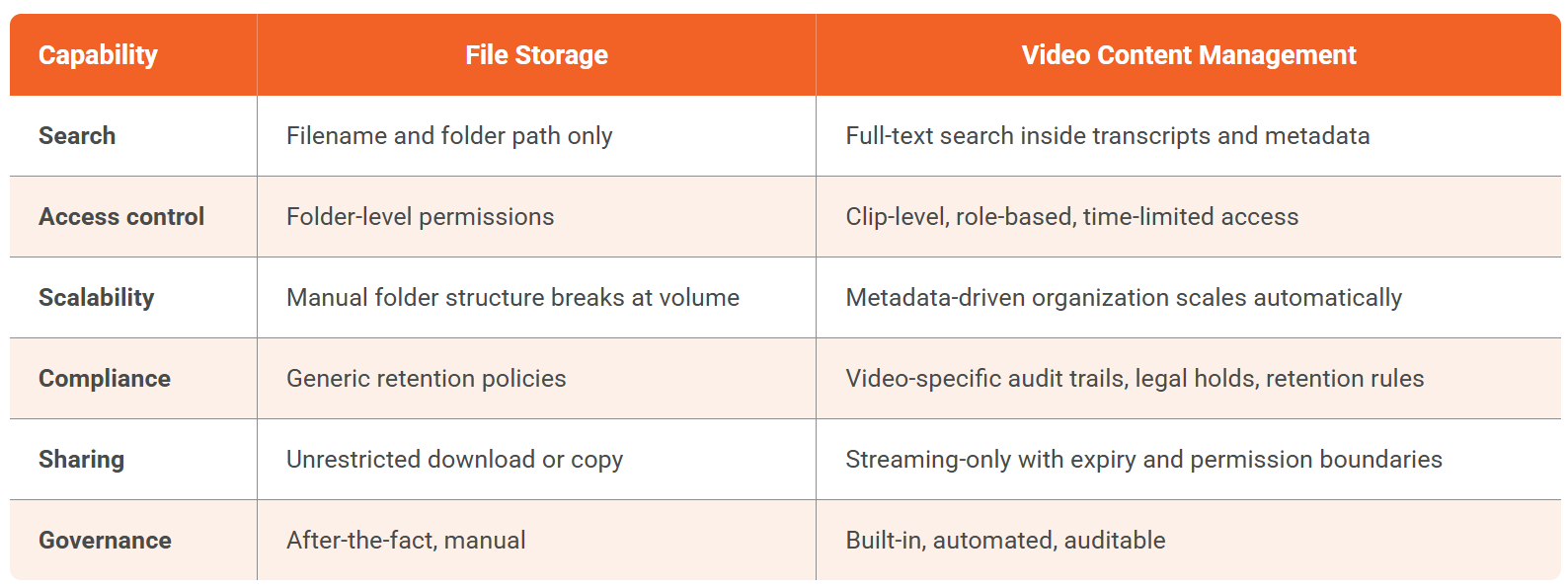
The search gap is the most disruptive in practice. File storage treats video as a black box — it can search file names and folder paths, not the information inside the recording. A 90-minute all-hands, a product demo, a deposition recording; all of it is inaccessible unless someone watched it, remembered it, and named the file correctly. Video content management indexes the transcript, making every spoken word retrievable in seconds.
So which is right for your organization? File storage is sufficient when video is incidental — a few recordings per month, no compliance requirements, no need for internal search. The moment video becomes operational — training libraries, sales enablement content, compliance recordings, knowledge bases — file storage creates more overhead than it saves. Enterprises move to video content management when they need control without friction.
What Are the Core Benefits of a Video Content Management System?
How Does Centralized Management Eliminate Content Chaos?
A VCMS provides a centralized video library to store and manage all your media, ensuring every team can access content without wasted effort. A single platform stores, categorizes, adds metadata, and makes search easy, replacing the inconvenience of storage across multiple platforms and giving you control over creation and distribution.
What Security Features Protect Sensitive Video Content?
Security is a top concern when video contains proprietary or regulated information. With a VCMS, you can set role-based access controls (RBAC) to ensure relevant media is shared only with the right roles. User and group-level permissions allow granular control, deciding who can view, edit, or download specific media. Comprehensive encryption and audit trails provide accountability and compliance documentation.
For example, a video recording of a board meeting discussing financial performance should not be accessible to the entire organization. RBAC ensures only the authorized user group can view it.
How Does a VCMS Handle Scalable Storage as Video Grows?
Unlike documents or images, video files are large and come in multiple formats and resolutions. A VCMS provides hassle-free storage and delivery without compromising quality or performance. It efficiently handles hundreds or thousands of videos, ensuring content remains available and accessible as the library grows.
How Does AI-Powered Search Transform Video Discovery?
Due to advanced VCMS features, search takes far less time. Categories, filters, metadata, and AI capabilities make discovery efficient. With AI-powered search, finding information becomes a matter of seconds rather than minutes.
A viewer can search within a specific segment of a video where target words were mentioned. For example, an employee cannot scrub through a 3-hour meeting recording to find what the HR team discussed. Instead, they can select the last hour of the video, type a keyword, and get results in seconds.
Some platforms also provide automatic transcriptions in multiple languages and video insights such as facial recognition, sentiment analysis, and topic detection for better searchability. For a deeper look at how AI transcription enables this, see How AI Video Transcription Transforms Video Content Management.
What Engagement Data Can You Extract From Video Analytics?
Consumer platforms give you view counts. An enterprise VCMS provides in-depth analytics: how many employees viewed and completed a training video, their interaction level, whether quizzes were filled out, and what quiz assessment reports reveal.
Both media-level and user-level granular analytics are available for each piece of content and each viewer, enabling informed decisions. Additional analytics include engagement trends, top devices and browsers, demographics, and heat maps for content performance analysis. For strategies on leveraging this data, see Video Engagement: 9 Essential Analytics to Improve Results.
How Does a VCMS Support Live Streaming at Scale?
Hosting a live stream is straightforward when your VCMS supports CDNs, encoding and transcoding capabilities, and adaptive bitrate streaming. Unlike website CMS platforms that cannot convert video automatically into optimized formats, a VCMS transcodes video to the best format for each viewer. Businesses can broadcast events, webinars, product launches, or internal meetings in real time and distribute live content securely.
How Does a VCMS Improve Cross-Team Collaboration?
With video files accessible to each team from a single platform, cross-collaboration becomes seamless. No team has to wait hours for another department to share data. With one click, an IT administrator or department manager can grant access to any file or entire category. Annotations, comments, quizzes, and surveys increase engagement and drive active collaboration.
Why Is a VCMS More Cost-Effective Than Multiple Tools?
A good VCMS consolidates multiple tools into one platform, handling storage, streaming, transcription, translation, analytics, and security. This eliminates the cost of maintaining separate licenses and subscriptions for each function. It sets your business on the right course without requiring separate automation workflows for video operations.
How Do Different Departments Use a Video Content Management System?
Corporate Communications
A video CMS centralizes all internal and external communication videos for consistent messaging. CEO messages, company announcements, crisis communications, policy updates, stakeholder meetings, and regulatory communications are all stored and managed from one platform. The VCMS also hosts virtual events, webinars, and live streams with interactive features and post-event analytics.
Employee Training
Specialized product training, sales staff training, onboarding videos, knowledge transfer recordings, and compliance modules can all be created, stored, securely accessed, and distributed using a VCMS. With built-in features like video analytics for learning, L&D teams track completion, measure effectiveness, and identify modules that need improvement, all without leaving the platform.
Video Marketing
Marketing teams streamline video campaigns, manage assets, and distribute content across channels. Product demos, customer testimonials, and promotional videos are organized and tagged for quick retrieval. Analytics let the team track impressions, views, and watch time to optimize campaigns and feature high-performing content.
Sales
Sales calls, demo pitches, and training materials are stored and categorized in one accessible location. Reps can quickly pull up the right content for prospect meetings or follow-ups, and refresh their knowledge by reviewing training recordings, ensuring they always have up-to-date, relevant material at their fingertips.
Legal and Compliance
Confidential interviews, legal proceedings, compliance training sessions, and other sensitive video content can be securely stored and shared with authenticated and authorized users. Internal product information and training material can be password-protected with limited shareability, keeping the organization compliant and safeguarding sensitive information.
What Practical Workflows Does a VCMS Enable?
Workflow 1: Make Videos Searchable in Minutes, Not Hours
Videos are uploaded, categorized, and enriched with metadata. With AI transcription and indexing, teams search for spoken words inside recordings and jump directly to the relevant moment instead of scrubbing through an hour-long file. This is especially useful for training libraries, policy updates, and meeting archives where the value is usually one segment, not the entire recording.
Workflow 2: Share Securely Without Losing Control
Instead of sending files or open links, teams share video with permission boundaries by department, role, or category. This matters for executive communications, HR training, compliance updates, and healthcare content where privacy expectations are higher.
Workflow 3: Manage Growth Without Turning Video Into a Cost Center
A VCMS standardizes formats (transcoding), improves delivery performance, and keeps the library organized as it grows. Just as important, it reduces duplication so teams stop re-uploading the same content to different systems.
How Do You Choose the Right Video Content Management System?
Choosing the right VCMS matters, not just for cost, but for the time and effort involved in training, migration, and long-term adoption. The first step is assessing your business needs. The next step is understanding which features and capabilities will solve them.
For example, if you use your VCMS for corporate communication and want it to reflect your organization rather than a third party, custom branding becomes a must.
Based on the universal nature of challenges in enterprise video management, these are the essential capabilities every VCMS should have: metadata management, category access rights, multi-format support, interactivity and video analytics, data security and secure sharing, and third-party integrations. Need an in-depth look at choosing the right platform? Read our detailed blog on key features of video CMS.
Why Choose VIDIZMO EnterpriseTube as Your Video Content Management System?
VIDIZMO EnterpriseTube is a Gartner-recognized enterprise video content management platform designed for organizations of all sizes. The platform offers on-premises, cloud, and hybrid deployment options, ensuring maximum flexibility based on your IT and compliance requirements.
EnterpriseTube enables businesses to store, stream, and share video content securely through advanced features like AI-powered search, automated metadata tagging, role-based access control (RBAC), and end-to-end encryption. It supports live and on-demand video streaming, integrations with enterprise tools such as Microsoft Teams, Zoom, and LMS systems, and complies with industry standards like GDPR and HIPAA.
With EnterpriseTube, your organization goes beyond simple video hosting. You create a branded, interactive video portal, enhance employee engagement, track detailed video analytics, and ensure secure video management across departments.
Americold, a global cold storage leader with over 16,000 employees, migrated from SharePoint to EnterpriseTube after experiencing persistent buffering and poor playback quality. The centralized platform resolved their video delivery issues and gave departments organized, searchable access to training and communications content.

Take the Next Step
A secure video content management system helps you store, organize, and distribute videos securely while enabling teams to collaborate, analyze, and scale effortlessly. Whether deployed on-premises or in the cloud, a VCMS ensures data security, compliance, and high-performance video delivery across your organization.
Ready to take control of your video strategy? Start your 7-day free trial of EnterpriseTube and see how a video CMS can elevate your business.
People Also Ask
A video content management system is software that helps an organization store, manage, organize, and secure its video content. It also provides hosting and analytics capabilities for organizations that need to go beyond basic file storage.
All organizations with significant volumes of video data benefit from a VCMS. It improves cross-departmental collaboration, maintains regulatory compliance, and safeguards information. Various departments use it for corporate communication, employee training, video marketing, sales enablement, and legal compliance.
Core benefits include centralized management, enhanced security, scalable storage, AI-powered search, improved collaboration, in-depth analytics, live streaming support, and cost savings from consolidating multiple tools into one platform.
Not all video CMS platforms provide live streaming functionality, but Gartner-recognized EnterpriseTube offers a professional live streaming solution for enterprises with built-in eCDN support for up to 20,000 simultaneous participants.
EnterpriseTube provides automated tagging through AI, but not all video content management systems have AI capabilities or automated features. When evaluating platforms, ask for specific AI transcription and tagging capabilities.
About the Author

Jump to

Video CMS: A Complete Guide to Video Content Management Systems [2026]
%20A%20Complete%20Overview.webp)
Enterprise Video Content Management (EVCM): A Complete Overview
.webp)

No Comments Yet
Let us know what you think