
by Ali Rind, Last updated: May 22, 2026
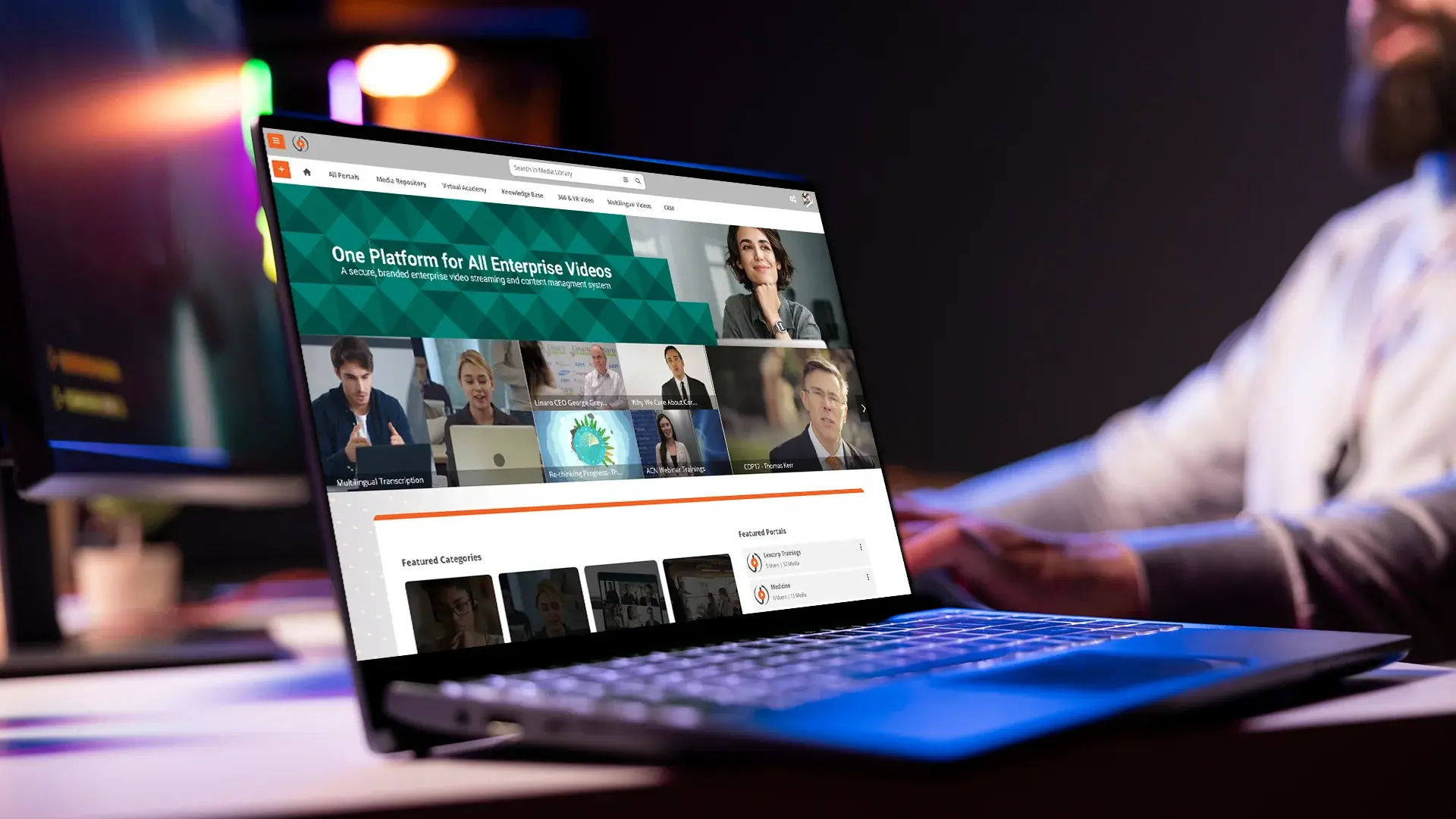
An IT team built a video portal years ago to solve a specific problem: hosting some internal videos behind the firewall, maybe with a few permission rules. It worked. It still works. The trouble is that the requirements have moved on.
Today, the same stakeholders are asking for AI search, transcription, retention enforcement that survives an audit, and granular permissions that the original codebase was never designed to support. The compliance team is asking questions the application owner cannot answer with confidence. The engineer who built it has left, or is about to. And the cost of one more feature request keeps climbing.
This is a guide for the people sitting in exactly that position. When does the build cross the line from "still working" to "time to replace," and how do you migrate to a commercial platform without disrupting the workflows that depend on it. For the broader context of what a modern enterprise video platform looks like end to end, the home page covers the high-level picture.
When Your In-House Video Portal Stops Working: Five Replacement Signals
Most replacement decisions cluster around five signals. If two or three of these apply, the conversation is overdue.
Compliance Questions You Cannot Answer Confidently
Where is the data stored. Who has accessed which video. What retention policy applied to last quarter's deleted content. If the answer is "let me check with the engineer who built it," the platform is already failing its compliance role.
One Engineer Holds All the Institutional Knowledge
The bus factor is one. Documentation lives in someone's head. Any change request requires that person. When they leave, the system enters a slow freeze where nothing can be modified safely.
Security Patches and Dependencies Are Falling Behind
The video player is on an outdated codec library. The streaming server has not had a security update in 18 months. The framework underneath the portal is two major versions behind. Each patch is a project, and projects keep getting deferred.
Stakeholders Are Asking for Features the Build Does Not Support
AI transcription. In-video search across spoken content. Auto-generated chapters. Embedded forms tied to a CRM. Native redaction for sensitive content. These are not feature requests anymore. They are minimum-viable expectations for a modern feature set.
Workflows Are Scattered Across Tools
Recordings live in Teams. Edited cuts live on SharePoint. The final published version lives in the portal. Captions are generated in a third tool. Each step is a manual handoff that breaks down whenever someone is out of office.
The Hidden Costs of Keeping a Homegrown Video Portal Alive
The original build was probably scoped on infrastructure alone. The hidden costs accumulate on the side of the ledger that never gets reviewed.
Engineering time is the largest. Every framework upgrade, security patch, and dependency update consumes hours the business could spend elsewhere. A homegrown portal at maintenance mode still costs a fraction of one engineer indefinitely. At feature-request mode, more.
Storage grows without bound when retention is not enforced. Five years of recorded town halls, training, and Zoom imports add up to tens of terabytes. Without auto-destruction, none of it gets cleaned up. Storage bills compound while compliance exposure grows in parallel.
Compliance documentation gets built from scratch every audit. The auditor asks for an access log report. The engineer pulls a database query, formats the result, and hopes it satisfies. Next year, same exercise. A commercial platform ships audit-ready reporting on day one.
Bandwidth and transcoding at scale are rarely budgeted. A 5,000-employee town hall over the corporate WAN, without an eCDN, can saturate the network. The fix is either an eCDN appliance or a platform that includes one. Building an eCDN in-house is a project nobody finishes.
Productivity drag from no AI search is the cost nobody quantifies. Employees who cannot find the right clip in a 45-minute recording give up and ask a coworker. The shift from sitting through full recordings to jumping to the relevant moment is the core thesis of our piece on AI video search, and the productivity gap shows up across departments long before anyone names it.
The bus factor turns from cost into crisis when the original builder leaves. The system enters read-only mode for everything but urgent fixes. Replacement gets delayed because nobody understands the code, then becomes urgent because the system breaks.
Build vs Buy: A Decision Framework for Video Portals
The right answer is not always "buy." It depends on use case complexity, compliance scope, required capabilities, engineering availability, and time pressure. The table below is a starting point. Use it honestly.
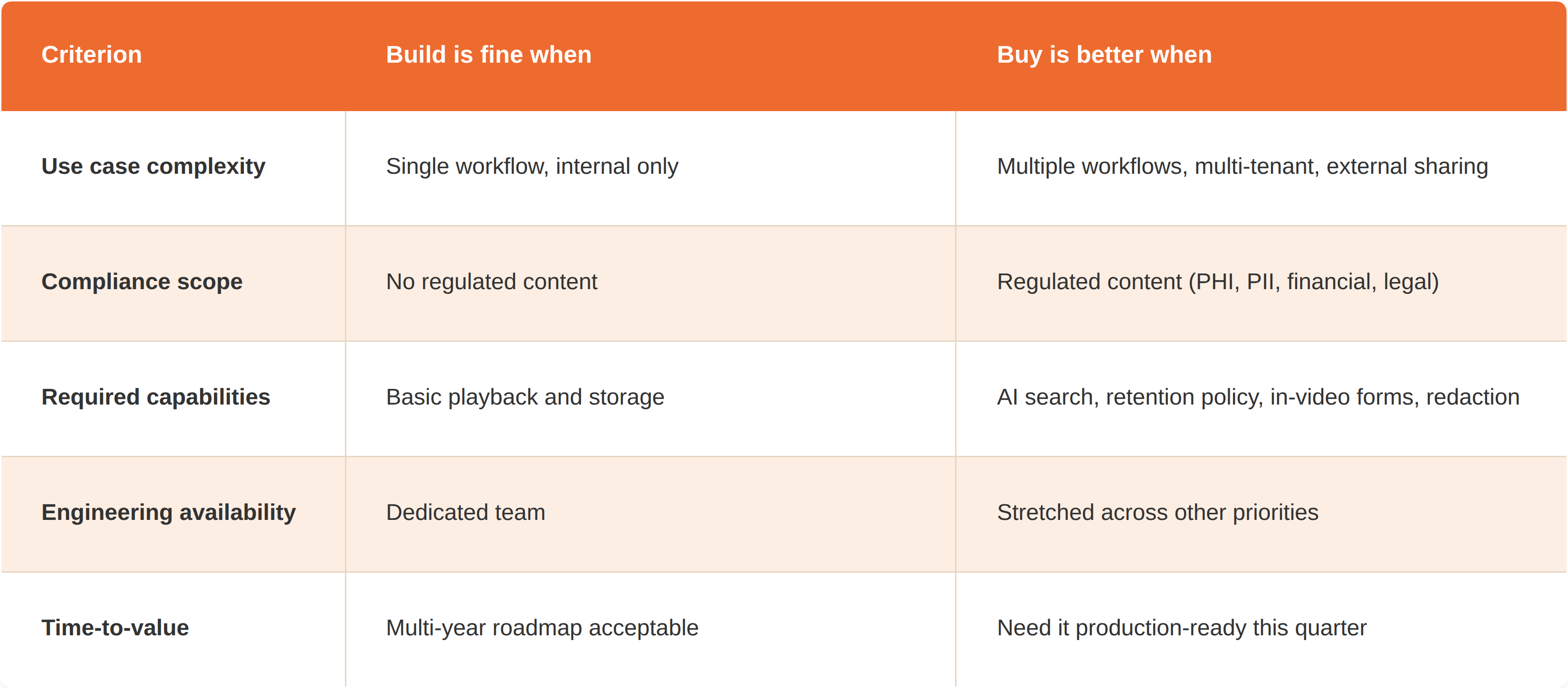
If three or more rows land in the "buy" column for your situation, the decision is made. The remaining question is which platform, not whether to migrate. For a parallel evaluation framework that overlaps with this one, the post on evaluating VOD platforms in 2026 walks through buyer criteria from a slightly different angle.
What Modern Video Platforms Include That In-House Builds Usually Miss
This is the gap audit. If your current portal is missing more than two of these, the build has fallen behind market expectations.
- AI transcription, summaries, automatic chapters, semantic search across spoken content
- Configurable retention policies with auto-destruction at the end of the lifecycle
- Group-based and per-video permissions tied to your identity provider
- Embedded forms, quizzes, and surveys with exportable data tied to CRM and LMS
- SSO, SCIM provisioning, MFA, and full audit trails
- Multi-region storage options for data residency requirements
- Adaptive bitrate streaming and a built-in enterprise content delivery network
- Pre-built integrations with Microsoft Teams, Zoom, Webex, SharePoint, and major learning management systems
For the deeper view of what a purpose-built video content management system actually covers, the dedicated guide breaks each capability down with the underlying rationale.
A Six-Phase Migration Plan for Replacing Your Video Portal
Most migrations that go badly skip phase 2 and rush phase 4. The six phases below assume a 90-to-120-day timeline for a mid-market organization with a few terabytes of content.
Phase 1: Audit the Existing Portal
Catalog what is stored in the existing portal: total content, total storage, formats, who uses it, which workflows depend on it, which integrations are wired up, and what compliance policies apply. This is the document you will reference for the rest of the migration.
Phase 2: Define Future-State Requirements
Residency, retention, permission model, integrations, and compliance documentation needs all need to be specified before vendor evaluation. This is where most teams short-cut. The result is a platform purchase that solves the easy half of the problem and leaves the hard half for later.
Phase 3: Run the Build vs Buy Decision Honestly
Name the internal pressure to "just fix" the existing portal one more time. That pressure is real. It is also why most homegrown portals stay too long. Force the decision against the table above, with the future-state requirements in hand.
Phase 4: Validate With a Real Proof of Concept
Use real content, real users, and real permissions. Test the hardest workflow first, not the easiest demo. If the platform handles your worst case, it will handle the rest. If it fails on a moderate case, the contract phase is where you find out, not the sales call.
Phase 5: Migrate in Waves, Not All at Once
Pilot organization first, then a small department, then full rollout. Keep the old portal read-only during transition so people can still find old content while the new one becomes the source of truth. Two-way sync is rarely worth the engineering cost. A clean cutover with a read-only legacy window is usually simpler.
Phase 6: Decommission the Legacy System Cleanly
Snapshot the audit logs the compliance team needs. Retain whatever policy requires. Archive the rest into cold storage. Shut down the old infrastructure on a documented date. A homegrown portal that never gets turned off becomes a liability for the security team forever.
Common Pitfalls That Derail Video Portal Migrations
A few patterns show up in postmortems of migrations that went badly.
Treating the project as an IT migration instead of a workflow change. The old portal had habits attached: where people uploaded, who tagged content, who approved. The new platform will have different defaults. If the workflow change is not communicated, adoption stalls and people keep using the old portal until it is forced off.
Migrating files but not permissions. The content lands cleanly. The permission model does not. Suddenly the wrong people can see HR content, or the right people cannot access compliance training. Permission mapping has to be planned, tested, and verified before cutover.
Underestimating training for external uploaders. Internal employees adapt quickly. Contractors, partners, and external producers who upload content need actual training, not just an email link to documentation.
Letting the old portal linger in active mode. Both systems live in parallel. Governance breaks. Compliance does not know which is the system of record. Force the read-only date and hold it.
Picking the platform without testing the hardest workflow first. The demo always looks good. The contract closes on the demo. The hardest workflow surfaces the gaps three months later when the team is already committed.
Replacing Your Video Portal Is a Maturity Step
The original portal solved its problem and served the requirements that existed when it was built. The requirements changed. The portal did not. The job now is to migrate to a platform that handles today's requirements and to land on one that will not need replacing for the same reasons in three years.
The replacement decision is not a failure of the original engineering. It is recognition that the build crossed a line where the cost of maintaining it exceeds the cost of moving on.
EnterpriseTube covers the capability checklist above, with flexible deployment, AI-powered search and transcription, configurable retention, and the integrations IT teams need to retire legacy systems cleanly. Take a closer look at the full feature set or start a free trial to test it against your hardest workflow.

About the Author

Jump to

In-Video Search for Enterprise Training: Find Any Moment in Seconds

Is Vimeo HIPAA Compliant? Vimeo vs EnterpriseTube for Healthcare Video
.webp)

No Comments Yet
Let us know what you think