
by Ali Rind, Last updated: April 27, 2026
.webp)
Video encoding converts raw video files into compressed digital formats that can be stored, transmitted, and played back across different devices and networks. Without proper encoding, organizations face bloated storage costs, buffering playback, and inconsistent viewer experiences across browsers and screen sizes.
For enterprises managing hundreds or thousands of video assets (training libraries, recorded town halls, product demos), encoding decisions directly affect how much you spend on storage and how reliably your audience can watch content. This guide covers what video encoding actually does, which settings matter most, and how to configure encoding workflows for enterprise-scale video storage and delivery.
What Is Video Encoding and Why Does It Matter?
Video encoding takes uncompressed or lightly compressed video and applies a codec (coder-decoder) to reduce file size while preserving visual quality. A single hour of uncompressed 1080p video can exceed 400 GB. After encoding with H.264, that same hour typically shrinks to 2-5 GB, depending on bitrate settings.
That compression makes video practical for streaming and storage. But encoding isn't just about shrinking files. It also determines:
- Playback compatibility across browsers, mobile devices, and smart TVs
- Streaming performance over varying network conditions
- Storage costs for organizations hosting large video libraries
- Visual fidelity for content where quality can't be sacrificed (medical imaging, product demos, training simulations)
Pick the wrong codec or bitrate, and you'll either waste storage on oversized files or frustrate viewers with pixelated playback.
How Do Video Codecs Differ from Containers?
This distinction trips up even experienced IT teams. A codec (like H.264, H.265/HEVC, VP9, or AV1) handles the actual compression algorithm. It decides how pixel data gets reduced and reconstructed. A container (like MP4, MKV, or WebM) is the file wrapper that packages the encoded video stream alongside audio tracks, subtitles, and metadata.
Think of it this way: the codec is the recipe for compressing the video. The container is the box holding all the ingredients together.
Here's how the most common enterprise codecs compare:
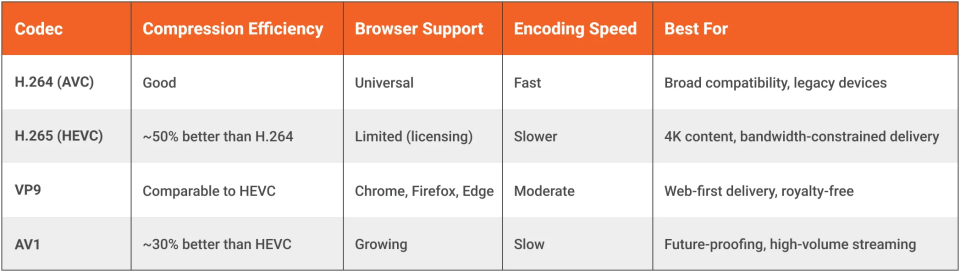
For most enterprise video libraries, H.264 in an MP4 container remains the safest default. It plays everywhere. Organizations with 4K requirements or high storage volumes should evaluate H.265 or AV1 for the compression savings, but verify device support before committing.
Which Encoding Settings Impact Quality and File Size Most?
Three settings control the balance between visual quality and file size. Getting these right saves real money at scale.
Bitrate
Bitrate is the amount of data allocated per second of video, measured in Mbps or kbps. Higher bitrate means better quality but larger files. For 1080p content, 5-8 Mbps is a common target. For 4K, you're looking at 15-25 Mbps with H.264, or 8-15 Mbps with HEVC.
Variable bitrate (VBR) encoding adjusts the data rate scene by scene. Fast-motion sequences get more bits; static talking-head shots get fewer. VBR consistently outperforms constant bitrate (CBR) for on-demand content because it allocates data where it's actually needed.
Resolution
Resolution defines the frame dimensions. Common tiers:
- 720p (1280x720), sufficient for most training and internal communications
- 1080p (1920x1080), standard for professional content
- 4K (3840x2160), needed for detailed visual content like medical or engineering use cases
Encoding at a higher resolution than your source footage adds file size without improving quality. Match your output resolution to the source, or step down intentionally for bandwidth-limited audiences.
Frame Rate
Most corporate and training video works well at 30 fps. Content with significant motion (product manufacturing demos, sports training) benefits from 60 fps. Don't encode at 60 fps unless your source material was captured at that rate.
Why Adaptive Bitrate Streaming Depends on Smart Encoding
Adaptive bitrate streaming (ABR) is the standard for delivering video over the internet. Protocols like HLS and MPEG-DASH work by offering the player multiple quality levels of the same video. The player switches between them in real time based on the viewer's available bandwidth.
In practice, a single source video must be encoded into multiple renditions: perhaps 360p, 720p, 1080p, and 4K. Each rendition is segmented into small chunks (typically 2-10 seconds), and the player requests the appropriate quality level for each chunk.
The quality of those renditions depends entirely on encoding settings. Poorly encoded lower-tier renditions create jarring quality drops when bandwidth fluctuates. Well-tuned encoding profiles ensure smooth transitions that viewers barely notice.
A good ABR ladder for enterprise content typically includes four to six renditions. More than that adds diminishing returns in viewer experience while increasing storage and processing costs.
VIDIZMO EnterpriseTube handles ABR encoding automatically, generating both HLS and MPEG-DASH renditions with support up to 4K resolution. Administrators can configure custom transcoding profiles to set output formats, resolution tiers, and target bitrates based on their organization's bandwidth and quality requirements.
Encoding Workflows for Enterprise Video Libraries
Small teams can encode files manually with tools like FFmpeg or HandBrake. That approach falls apart when you're processing hundreds of uploads per week across multiple departments.
An enterprise encoding workflow should include:
- Automated ingestion: accept uploads in any source format without requiring contributors to pre-encode
- Profile-based transcoding: apply preset encoding configurations based on content type (training video gets different settings than a marketing demo)
- Multi-rendition output: generate ABR renditions automatically for consistent streaming quality
- Thumbnail and preview generation: extract visual assets during the encoding pipeline
- Metadata preservation: retain title, description, tags, and custom fields through the encoding process
- Status tracking: provide visibility into encoding queue progress, failures, and completion
The goal is zero manual encoding effort for content contributors. A trainer records a session, uploads it, and the platform handles the rest.
EnterpriseTube accepts 255+ input formats and runs automated transcoding with configurable profiles. Content uploaded through bulk imports, Amazon S3, or conference tool integrations (Microsoft Teams, Zoom, Webex) flows through the same encoding pipeline without manual intervention.
Storage Tiers and Encoding: Balancing Cost with Access Speed
Encoding decisions have a direct relationship with storage architecture. A single 30-minute training video encoded into five ABR renditions might consume 3-5 GB. Multiply that across a library of 10,000 videos, and storage costs become a real budget conversation.
Tiered storage helps manage this. The concept is straightforward:
- Hot storage: fast access for actively viewed content (recent uploads, popular videos)
- Cool/cold storage: reduced cost for infrequently accessed content
- Archive storage: lowest cost for retention-only content that rarely gets played
Smart encoding plays into this strategy. You might keep all ABR renditions on hot storage for the first 90 days, then move lower-resolution renditions to cold storage while keeping only the primary rendition readily available. If a viewer requests an archived video, the system re-promotes it.
EnterpriseTube provides hot, cold, and archive storage tiers with automated migration based on access frequency and content age. Combined with configurable retention and lifecycle policies, older training content doesn't eat into your storage budget at the same rate as your most-watched videos.
Common Encoding Mistakes That Hurt Enterprise Video
Certain patterns come up repeatedly in large video libraries.
Over-encoding for the audience. If 90% of your viewers watch on laptops over corporate Wi-Fi, encoding at 4K with 25 Mbps burns storage for no benefit. Match renditions to actual viewer behavior.
Ignoring audio encoding. Video gets all the attention, but audio quality matters more for training and communication content. AAC at 128-192 kbps is the standard. Drop below 96 kbps, and spoken word content starts sounding noticeably degraded.
Single-rendition encoding. Uploading one "good enough" quality level forces viewers on slower connections to buffer or abandon the video entirely. ABR isn't optional for enterprise deployment.
Not accounting for multi-language audio. Global organizations often need multiple audio tracks per video. Your encoding workflow needs to support parallel audio channel processing, not just subtitle overlays. EnterpriseTube supports up to seven audio channels per asset with dynamic language switching during playback, covering this requirement without workarounds.
Skipping codec evaluation cycles. H.264 is safe but not always optimal. Organizations spending six figures annually on video storage and CDN should benchmark H.265 or AV1 compression on representative content samples. The encoding time increase often pays for itself in reduced storage and bandwidth costs within months.
How EnterpriseTube Handles Video Encoding
VIDIZMO EnterpriseTube automates the encoding pipeline from ingestion through delivery. Here's what that looks like in practice:
- 255+ format support: upload virtually any video, audio, image, or document format, and the platform handles conversion
- Custom transcoding profiles: configure output format, resolution, and bitrate per content type or organizational need
- Adaptive bitrate output: automatic HLS and MPEG-DASH rendition generation up to 4K
- Tiered storage integration: hot, cold, and archive tiers with automated lifecycle migration
- Multi-source ingestion: encoding pipeline accepts content from bulk uploads, Amazon S3, Microsoft Teams, Zoom, and Webex recordings
- Seven audio channels: encode and deliver multiple language audio tracks per asset with dynamic switching
- AI-powered post-processing: after encoding, content automatically goes through transcription (82 languages), chaptering, and tagging
EnterpriseTube is recognized as a Gartner Challenger in the Enterprise Video Content Management (EVCM) category and deploys across SaaS, government cloud, on-premises, and hybrid environments.
Ready to simplify video encoding for your organization? Learn how EnterpriseTube manages encoding, storage, and delivery at enterprise scale.
Frequently Asked Questions
What is video encoding?
Video encoding compresses raw video data using a codec (like H.264 or H.265) into a smaller file format suitable for streaming, storage, and playback. The process removes redundant visual information while preserving quality at a level appropriate for the target audience and delivery method.
What's the difference between video encoding and transcoding?
Encoding converts raw or uncompressed video into a compressed format. Transcoding converts an already-encoded video from one format or codec to another. In practice, enterprise video platforms like VIDIZMO EnterpriseTube perform transcoding when they accept an uploaded MP4 and generate multiple adaptive bitrate renditions from it.
Which video codec is best for enterprise streaming?
H.264 remains the most widely compatible codec for enterprise video streaming, supported across all major browsers and devices. H.265 (HEVC) offers roughly 50% better compression efficiency and works well for 4K content, but browser support is limited. VIDIZMO EnterpriseTube supports adaptive bitrate streaming with both HLS and MPEG-DASH, so playback works regardless of the viewer's device or browser.
How does video encoding affect storage costs?
Encoding settings directly control file size. A one-hour 1080p video encoded at 8 Mbps produces roughly 3.6 GB per rendition. With five ABR renditions, that single video could consume 10-15 GB. Organizations with thousands of videos should pair efficient encoding with tiered storage (hot, cold, archive) to manage costs. EnterpriseTube provides automated storage tier migration based on content access patterns.
How does VIDIZMO EnterpriseTube compare to manual encoding with FFmpeg?
FFmpeg is a powerful open-source encoding tool, but it requires command-line expertise, manual workflow management, and custom infrastructure for scaling. EnterpriseTube automates the full pipeline: ingesting 255+ formats, applying configurable transcoding profiles, generating ABR renditions, and running AI post-processing (transcription in 82 languages, chaptering, tagging) without any manual encoding steps.
Can video encoding support multiple audio languages?
Yes. Modern encoding workflows can process multiple audio tracks within a single video asset. This is essential for global organizations delivering training or communications across regions. VIDIZMO EnterpriseTube supports up to seven audio channels per asset with dynamic language switching, so viewers select their preferred language during playback without needing separate video files.
What is adaptive bitrate streaming and why does it need encoding?
Adaptive bitrate streaming (ABR) delivers video at varying quality levels based on the viewer's network speed. The video player switches between renditions in real time to prevent buffering. This requires the source video to be encoded into multiple resolution and bitrate tiers during the transcoding process. Without properly encoded renditions, ABR can't function.
About the Author

Jump to

Adaptive Bitrate Streaming: What It is and How ABR Streaming Works
VOD Streaming for Enterprises: How to Deliver On-Demand Video at Scale


No Comments Yet
Let us know what you think