
by Ali Rind, Last updated: March 6, 2026
Your organization has spent years building an on-premises video library. Training recordings, executive town halls, product demonstrations, compliance content, thousands of hours sitting on internal servers, accessible only to employees inside the firewall. The problem is not that the content is bad. The problem is that nobody can find it, nobody outside the building can access it, and nobody knows what is actually in it. On-premise video platform migration is not about swapping storage. It is about making years of invisible content usable again.
This guide is for the IT Director, CTO, or Digital Transformation Manager who has been asked to "do something" about a legacy video system that is holding the organization back. It covers why migration is accelerating in 2026, what the process actually involves, how AI transforms migrated content, and how to approach deployment with the flexibility your organization requires.
Why Enterprises Still Run On-Premises Video Infrastructure
Before discussing migration, it is worth acknowledging why so many organizations still maintain on-prem video platforms. These systems were not built carelessly. They were built under constraints that made sense at the time.
Compliance requirements drove early decisions. In sectors such as financial services, healthcare, and government, data residency and security mandates once made on-premises deployment the safest path. Storing video content within the organization's physical perimeter offered a clear answer to questions about data sovereignty and access control.
Bandwidth limitations shaped architecture. A decade ago, streaming high-definition video to hundreds of employees simultaneously was a genuine infrastructure challenge. Local servers with direct network connections delivered better performance than early cloud platforms could guarantee.
Sunk-cost momentum is real. When an organization has invested in servers, storage arrays, encoding appliances, and the IT staff to maintain them, there is a natural reluctance to write off that investment. The annual maintenance contract feels cheaper than a full migration, until you calculate what you are actually paying.
Integration dependencies accumulated. Legacy video platforms were wired into Single Sign-On (SSO) systems, internal portals, learning management tools, and custom workflows. Migration feels like pulling one thread in a tightly woven system.
These were rational decisions. The issue is that the conditions that justified them have changed, and the cost of staying on-premises has shifted from manageable to compounding.
Why On-Premise Video Platform Migration Is Accelerating
Several forces are converging to make 2026 the year enterprise video migration reaches critical mass.
Remote and Hybrid Work Changed the Equation
Content behind a firewall is invisible to anyone not in the building. When 40% or more of a workforce operates remotely or in a hybrid model, on-premises video infrastructure means a significant portion of the organization has no access to training recordings, corporate communications, or knowledge content. The access problem that was once a minor inconvenience has become a direct productivity hit.
Cloud-First Mandates Are Now Standard
Most enterprise IT strategies now default to cloud. On-prem infrastructure that was once the safe choice now requires justification, not the other way around. Every renewal of an on-prem video system becomes a conversation about why this particular workload is an exception to the organization's broader architecture direction.
AI Capabilities Require Modern Platforms
The most significant shift is that artificial intelligence (AI) features, including automatic transcription, content tagging, semantic search, chaptering, and summarization, are only available on modern cloud-native platforms. Legacy on-prem video systems were built for storage and playback, not intelligent content discovery. Migration is the prerequisite for unlocking AI across your video library.
If you are still calculating whether the operational overhead justifies the status quo, understanding the challenges of managing large video libraries is a critical first step.
Maintenance Costs Are Compounding
Hardware refresh cycles, storage expansion, encoding appliance maintenance, dedicated IT staff time, disaster recovery infrastructure, and software licensing fees add up. These visible costs are significant on their own. But the invisible costs, including content that employees re-create because they cannot find existing recordings, training that cannot be measured because there are no analytics, and knowledge that leaves when employees do, compound every year.
What Enterprise Video Migration Actually Involves
Migration is not a single event. It is a structured process with discrete phases. Demystifying those phases is the first step toward building confidence that the project is manageable.
Phase 1: Content Inventory and Assessment
Before moving anything, audit what exists. This means cataloging:
- Volume: Total hours of content, file count, and aggregate storage size
- Formats: Video, audio, image, and document formats currently in use
- Metadata: Titles, descriptions, tags, categories, access permissions, and organizational hierarchy attached to existing content
- Usage patterns: Content that is actively accessed versus content that has not been viewed in years
- Storage tier candidates: Which content belongs in hot storage (frequently accessed), cold storage (archived), and deep archive (retained for compliance only)
This inventory determines the scope, timeline, and cost of migration. It also reveals how much content is effectively invisible, present in the system but unsearchable, uncategorized, or inaccessible to the people who need it.
Phase 2: Format Compatibility
Legacy video libraries often contain content in dozens of formats accumulated over years of different recording tools, cameras, and encoding standards. A modern enterprise video platform should ingest content natively without requiring re-encoding.
EnterpriseTube, for example, supports 255+ formats, including video, audio, images, and documents. For most organizations, this means the existing library migrates without any format conversion, eliminating one of the most time-consuming and error-prone steps in a traditional migration.
For a detailed look at what a modern video content management system should offer, see our complete guide to enterprise video CMS.
Phase 3: Metadata Preservation
This is where IT teams rightly focus their concern. Metadata is what makes content findable. Losing it during migration means starting over with organization, categorization, and access control, even if the video files themselves arrive intact.
A well-planned migration preserves:
- Descriptive metadata: Titles, descriptions, tags, custom fields
- Structural metadata: Folder hierarchy, collections, categories, channels
- Access metadata: User permissions, role assignments, group memberships
- Technical metadata: Duration, resolution, encoding details, creation dates
- URL continuity: The ability to replace source files without breaking existing embed codes or links (EnterpriseTube supports version control that maintains URL persistence)
Phase 4: User and Permissions Mapping
On-prem platforms typically integrate with internal Active Directory or LDAP for authentication. Migration requires mapping those identities to the new platform's authentication layer.
Modern enterprise video platforms support SSO via SAML 2.0, OAuth 2.0, and OpenID Connect, along with SCIM provisioning for automated user management. This means user identities, roles, and group memberships can be mapped and provisioned automatically, not manually recreated.
Phase 5: Phased vs. Full Cutover
Not every organization needs to migrate everything at once. Two approaches are common:
- Full cutover: Migrate the entire library, redirect users, decommission legacy infrastructure. Best for organizations with clear cloud-first mandates and straightforward libraries.
- Phased migration: Move content in stages, by department, content type, or date. Run the legacy and cloud platforms in parallel during transition. Best for organizations with complex integration dependencies or regulatory constraints that require validation at each stage.
The ability to run a hybrid deployment during transition, keeping some content on-premises while serving new content from the cloud, significantly reduces migration risk.
Explore best practices for enterprise video migration — Download the guide to enterprise video strategy.
The AI Re-Indexing Advantage: Unlocking Content That Was Invisible
This is where migration stops being a maintenance project and starts being a capability upgrade.
On a legacy on-prem platform, video content is a file. You can play it if you know where it is. You cannot search within it. You cannot jump to the section you need. You cannot translate it. You cannot find every video that discusses a specific policy, product, or procedure.
When that content arrives on a modern AI-powered enterprise video platform, it becomes something different entirely.
What AI Does to Migrated Content
- Transcription: Every video is automatically transcribed in up to 82 languages with published Word Error Rate (WER) benchmarks. Content that was audio-only becomes text-searchable. Learn more about how AI video transcription transforms content management.
- Semantic search: Users can search across the entire video library by keyword, topic, speaker, or detected object and jump directly to the relevant moment within a video. See how AI video search solutions streamline enterprise workflows.
- Auto-chaptering: Long recordings are automatically divided into navigable chapters based on content transitions, making a 90-minute training session browsable in seconds.
- Summarization: AI generates written summaries of video content, providing quick overviews without requiring full playback.
- Tagging and classification: Content is automatically tagged based on detected topics, objects, faces, and scenes, eliminating the manual cataloging burden that kept most on-prem libraries unorganized.
- Translation: AI-generated translations make content accessible to global audiences without manual localization.
The practical result is that content which sat unused for years, because nobody could find it, search it, or navigate within it, becomes discoverable and usable the moment it lands on the new platform. A five-year-old compliance training video is suddenly searchable by topic. A library of executive town halls becomes a browsable knowledge base.
For organizations looking to find specific clips across large libraries after migration, this guide on how to find clips in your video library using AI search covers exactly that.
Deployment Flexibility: Migration Does Not Mean Cloud-Only
One of the most common concerns IT leaders raise about video migration is the assumption that "migration" means "full public cloud." For many enterprises, particularly those in government, defense, healthcare, and financial services, that assumption creates a barrier.
Modern enterprise video platforms offer multiple deployment options, meeting organizations where they are:
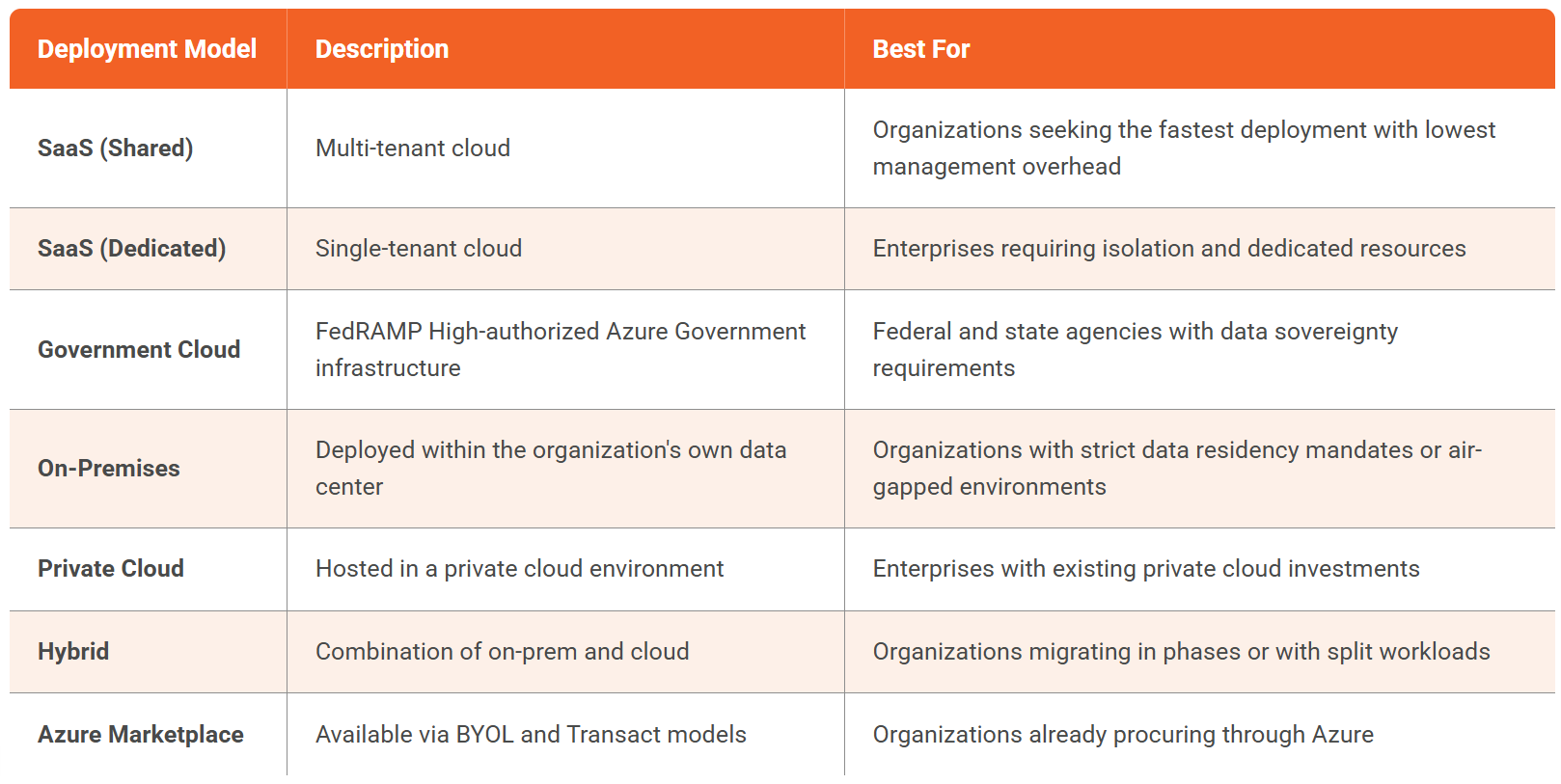
This flexibility matters because it removes the binary choice that stalls many migration conversations. An organization can begin with hybrid deployment, migrating new content to the cloud while keeping legacy content on-prem, and consolidate over time as confidence grows and compliance requirements are validated.
For organizations that need to keep some or all content on-premises even after evaluating migration, this guide on on-premises enterprise video platforms covers what to look for.
For government organizations, the ability to deploy on Azure Government Cloud means supporting FedRAMP High, CJIS, and IL4/IL5 requirements via the underlying infrastructure, without building a custom deployment from scratch.
Security and Compliance During Migration
Migration creates a temporary state where content is in transit between systems. For organizations in regulated industries, this is the phase where governance concerns are highest. A well-architected migration maintains compliance continuity throughout.
Encryption in Transit and at Rest
Content should be encrypted at every stage of migration. Modern platforms use AES-256 encryption at rest and TLS 1.2 for data in transit, ensuring that video files, metadata, and user data are protected throughout the migration process and after arrival.
Access Control Continuity
Migration should not create a gap in access governance. Role-Based Access Control (RBAC) with defined roles (Admin, Manager, Contributor, Viewer) ensures that permissions are enforced on the new platform from day one. Combined with SSO integration and Multi-Factor Authentication (MFA), user access is as tightly controlled post-migration as it was on the legacy system.
Audit Logging
For organizations subject to audit requirements in financial services (NYDFS), healthcare (HIPAA), or government (CJIS), audit log retention is non-negotiable. EnterpriseTube maintains 3+ year audit log retention, capturing who accessed what content, when, and from where. This audit trail begins the moment content lands on the platform.
For a deeper look at the security controls that matter most for enterprise video, read our guide on 12 ways to protect sensitive video data with enterprise video content security.
Geo-Restriction and Domain Controls
Content that was previously protected by the physical firewall now needs logical protection. Geo-restriction limits content access by geography. Domain controls restrict access to specific organizational domains. IP restrictions further narrow access to approved networks. These controls replace the physical security perimeter with a more granular, policy-driven model.
Compliance Framework Support
For organizations operating under specific compliance frameworks, migration infrastructure matters:
- FedRAMP High deployments are supported via Azure Government Cloud
- CJIS-compliant deployments are available on Azure Government
- HIPAA-compliant deployments are supported with appropriate configuration
- ISO 27001:2022 — VIDIZMO holds this certification directly
How EnterpriseTube Supports On-Premise Video Platform Migration
EnterpriseTube is an enterprise video content management platform built for the organizations described throughout this guide, those with years of accumulated content, complex security requirements, and a need for deployment flexibility.
Here is how it maps to the migration requirements covered above:
.jpg?width=800&height=502&name=image%20(7).jpg)
EnterpriseTube also integrates with the tools enterprises already use. For video conferencing ingestion, it connects with Microsoft Teams, Zoom, and Webex. For content embedding, it works with SharePoint and WordPress. For learning management, it supports Canvas, Moodle, Blackboard, and D2L via SCORM and LTI. For CRM integration, it connects with HubSpot and Salesforce. Learn more about video integrations for enterprise video content management.
Conclusion: Migration Is a Capability Upgrade, Not a Storage Swap
On-premise video platform migration is not about moving files from one place to another. It is about transforming a static, invisible content library into a searchable, governed, AI-powered knowledge asset that serves the entire organization, on any device, from any location, under any compliance framework.
The business case is straightforward. Legacy on-prem video infrastructure carries compounding costs: hardware maintenance, IT staff time, and, most significantly, the opportunity cost of content that nobody can find, search, or access. Migration eliminates those costs while adding capabilities that were never possible on the legacy system: AI transcription in 82 languages, semantic search, automatic chaptering, role-based access control, and deployment flexibility from fully cloud to fully on-premises.
The organizations that are migrating now are not taking a risk. They are eliminating one.
See how EnterpriseTube simplifies video migration — request a demo.

About the Author

Jump to

Replacing Legacy Enterprise Video Platforms For Your Organization: A Buyer Checklist
Is Vimeo HIPAA Compliant? Vimeo vs EnterpriseTube for Healthcare Video


No Comments Yet
Let us know what you think