
by Ali Rind, Last updated: March 9, 2026

Many enterprises in regulated industries cannot store video content on a vendor's public cloud. Data sovereignty requirements demand that all data remain within the organization's own cloud subscription. The question is not whether an enterprise video platform can run in the cloud. The question is whether it can run in your cloud.
An enterprise video platform Azure private cloud deployment solves this. The platform deploys directly within your Azure subscription. Your IT team retains control over networking, storage, encryption keys, and region selection. The vendor manages the application layer.
What BYOC Means for Enterprise Video
Bring Your Own Cloud (BYOC) is a deployment model where the vendor's software runs inside the customer's own cloud environment. The customer owns the Azure subscription, the resource groups, and all underlying infrastructure. The vendor manages the application, including updates, patches, and configuration.
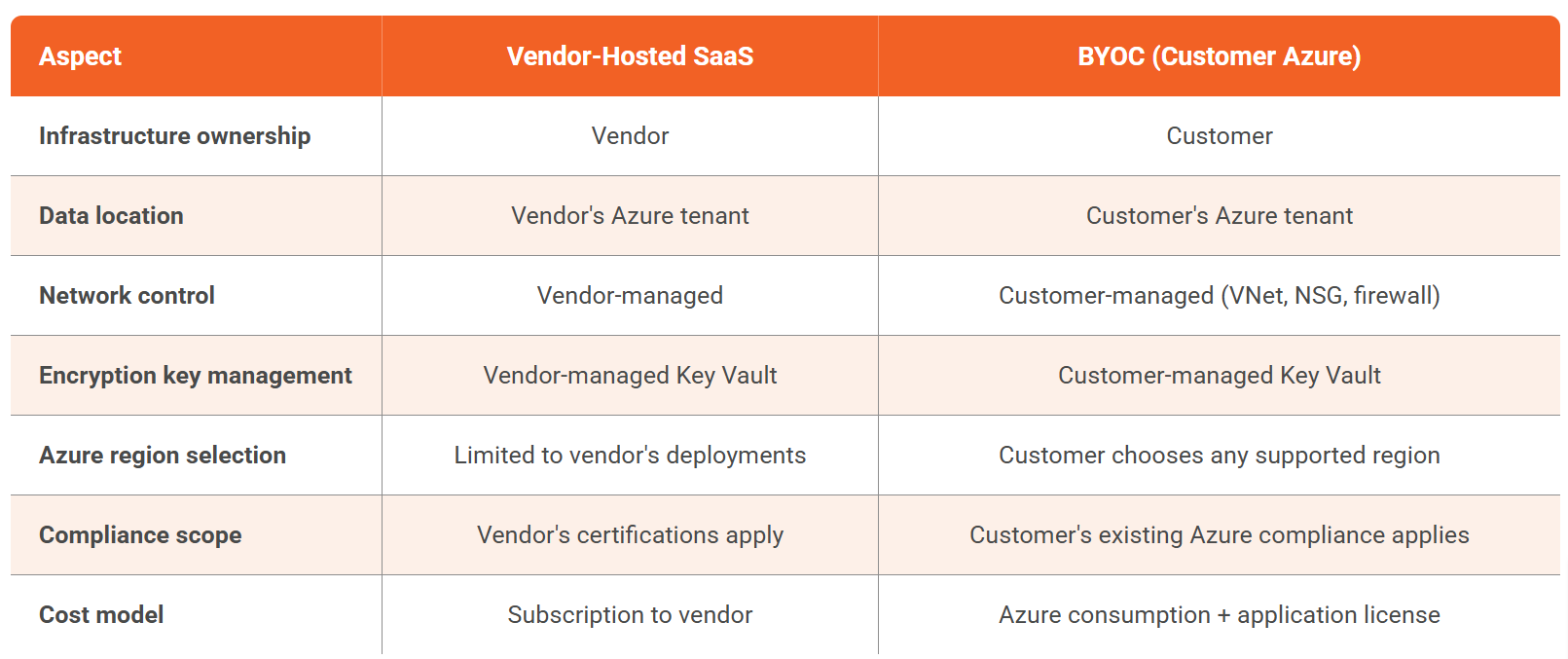
For organizations where data sovereignty is a firm requirement, BYOC is often the only model that passes internal security review.
Why Regulated Industries Choose This Model
Data never leaves your tenant. All video content, metadata, transcripts, user data, and audit logs reside within the customer's Azure subscription. No data traverses the vendor's infrastructure. This directly addresses regulatory requirements from NYDFS 23 NYCRR 500, GDPR, PIPEDA/BC FIPPA, and FINMA.
Your existing Azure compliance extends to the platform. If your organization already operates an Azure environment that meets SOC 2 Type II, HIPAA, or other frameworks, those controls automatically cover the video platform running within it. This simplifies vendor risk assessments because infrastructure compliance is already documented and audited. Learn more about how EnterpriseTube handles HIPAA-compliant video hosting.
Network architecture stays under your control. IT teams can place the platform within existing VNets, apply Network Security Groups (NSGs), route traffic through Azure Firewall, use Private Endpoints via Azure Private Link, and connect branch offices over ExpressRoute.
How EnterpriseTube Deploys on Customer Azure
The deployment provisions several Azure resource groups:
- Application tier: EnterpriseTube web application and API services, deployed as containerized workloads (Docker and Kubernetes supported)
- Database tier: SQL Server 2019 or 2022 for metadata, user management, and configuration
- Storage tier: Azure Blob Storage for video, transcripts, and documents with Hot, Cool, and Archive tiers and automatic migration based on access frequency
- AI processing tier: Transcription (82 languages), translation, summarization, and object detection using Azure Cognitive Services and Azure OpenAI within the customer's subscription
- CDN tier: Azure CDN for delivery, plus enterprise CDN (eCDN) with P2P edge caching for internal networks
- Key management: Azure Key Vault for encryption key storage and rotation
Azure Region Selection
Because the platform runs in your subscription, you select the Azure region:
- U.S.: Azure Government (Virginia, Arizona, Texas) for FedRAMP and CJIS; Azure Commercial for general enterprise
- Canada: Canada Central (Toronto) and Canada East (Quebec) for PIPEDA
- EU: West Europe, North Europe, France Central, Germany West Central for GDPR
- UK: UK South (London) and UK West (Cardiff) for FCA-regulated institutions
- Middle East: UAE North (Dubai) for NESA compliance
Encryption Key Ownership
Encryption keys are stored in your own Azure Key Vault. You control rotation schedules, can revoke keys to render data unreadable, and can use FIPS 140-2 validated HSMs for key protection. All data at rest uses AES-256 encryption. All data in transit uses TLS 1.2 minimum with TLS 1.3 support. For a deeper look at how EnterpriseTube handles data protection, see the data encryption feature overview.
What IT Teams Need to Prepare
Azure subscription and resources. Provision a dedicated subscription or resource group. Verify quotas for compute, storage, and networking. Review Azure Policies to ensure they do not block required resource types (container registries, Kubernetes clusters, Cognitive Services).
Identity and access management. Configure SSO via SAML 2.0, OAuth 2.0, or OpenID Connect with Azure AD (Entra ID). Enable SCIM provisioning for automated user lifecycle management. Create a service principal with least-privilege permissions.
Networking. Allocate subnets within an existing VNet or create a dedicated one. Configure internal DNS, provision an SSL certificate, and ensure firewall rules allow outbound access for Azure Cognitive Services. For fully isolated environments, air-gapped deployment with local AI processing is available.
Storage and backup. Configure Blob Storage with your standard redundancy level (LRS, ZRS, GRS). Apply existing backup and DR policies. Set content lifecycle rules aligned with regulatory retention requirements.
Monitoring and logging. Integrate with Azure Monitor for infrastructure metrics. EnterpriseTube audit logs (viewer interactions, content access, administrative actions) are stored in WORM-enabled storage. Export logs to your SIEM for centralized monitoring.
Deployment Timeline
- Discovery and scoping (1-2 weeks): Document requirements and plan resource provisioning.
- Environment preparation (customer-led): Provision Azure resources, configure networking, set up identity integration.
- Platform deployment (~4 hours): VIDIZMO deploys the application layer and validates functionality.
- Security validation and go-live: Customer security review, end-user testing, and production launch.
Marketplace and Procurement
EnterpriseTube is listed on the Azure Marketplace with BYOL and Transact models. Azure Marketplace transactions can count toward Microsoft Azure Consumption Commitment (MACC).
Getting Internal Approval
The BYOC model simplifies the CISO's security assessment because the most sensitive questions are answered by your own Azure environment:
- Data residency: All data stays in your chosen Azure region. Nothing flows through VIDIZMO infrastructure.
- Encryption keys: Customer-owned and managed in your Azure Key Vault.
- Network isolation: Platform operates within your VNet, firewall, and NSG rules.
- Vendor access: VIDIZMO uses a zero-standing-access model. Staff access requires break-glass authorization, is time-bound, MFA-enforced, and fully logged.
- ISO 27001: VIDIZMO holds ISO/IEC 27001:2022 certification.
- Vulnerability management: Weekly automated scans and quarterly penetration testing by independent assessors.
- Incident response: Breach notification within two business days. Patches applied within five business days of vendor release.
- No security breaches on record.
Organizations evaluating whether private cloud is the right fit versus a fully on-premises approach may also find the on-premises enterprise video platform guide useful. For teams looking to understand the full scope of enterprise video management, the enterprise video content management (EVCM) overview provides additional context.
Conclusion
EnterpriseTube's BYOC model provides a production-ready video platform that runs within your Azure subscription, inherits your existing compliance controls, and keeps all data under your organization's ownership. For IT teams in regulated industries, this eliminates the data sovereignty objections that block traditional SaaS procurement.
Want to see how EnterpriseTube deploys in your Azure environment? Contact sales to discuss deployment options and get a technical architecture review for your specific requirements.

About the Author

Jump to

Is Vimeo HIPAA Compliant? Vimeo vs EnterpriseTube for Healthcare Video

9 Top Private Video Hosting Platforms for Businesses


No Comments Yet
Let us know what you think